How to use Meta AI for business in 2026: Tips and how-tos
Marketing leaders have spent the last decade optimizing funnels, allocating budgets, and managing increasingly complex tech stacks.
In 2026, Meta AI disrupts that model by automating the most time-intensive parts of the customer journey, creating a shorter path to revenue and a more efficient use of marketing dollars. It鈥檚 integrated into the Meta platform ecosystem to help users鈥� teams brainstorm, create, and plan content.
While Meta AI powers the full AI ecosystem across Meta鈥檚 apps, Meta Business AI is the newer tool that transforms how companies drive revenue. This AI assistant steps into the customer-facing role of answering questions, recommending products, and moving buyers toward purchase in real time.
鈥檚 guide breaks down both layers of Meta鈥檚 AI ecosystem, but especially Meta Business AI, the tool changing how companies convert demand in 2026.
What is Meta AI for businesses?
is Meta鈥檚 general-purpose AI assistant built into Facebook, Instagram, Messenger, WhatsApp, and .
It helps users and businesses brainstorm content ideas, refine messaging, analyze information, generate images, and accelerate everyday marketing workflows. It鈥檚 the broad, consumer-facing layer of Meta鈥檚 AI ecosystem, designed to support productivity across platforms.
Meta Business AI is Meta鈥檚 business-grade conversational agent designed to automate sales and support interactions across the Meta ecosystem.
Trained on your catalog, website content, and past campaign performance, it functions as an automated assistant鈥攁nswering questions, recommending products, resolving objections, and guiding customers to purchase in real time.
By combining conversation, product knowledge, and user intent signals, Meta Business AI removes the friction points that typically slow conversions, such as:
- Searching for basic answers (pricing, sizing, availability, shipping, hours)
- Manually comparing products
- Resolving objections
- Jumping between multiple surfaces (DM 鈫� product page 鈫� FAQ 鈫� checkout)
- Waiting for support responses
- Re-entering information across forms
- Navigating complex or outdated site structures
How does Meta Business AI work?
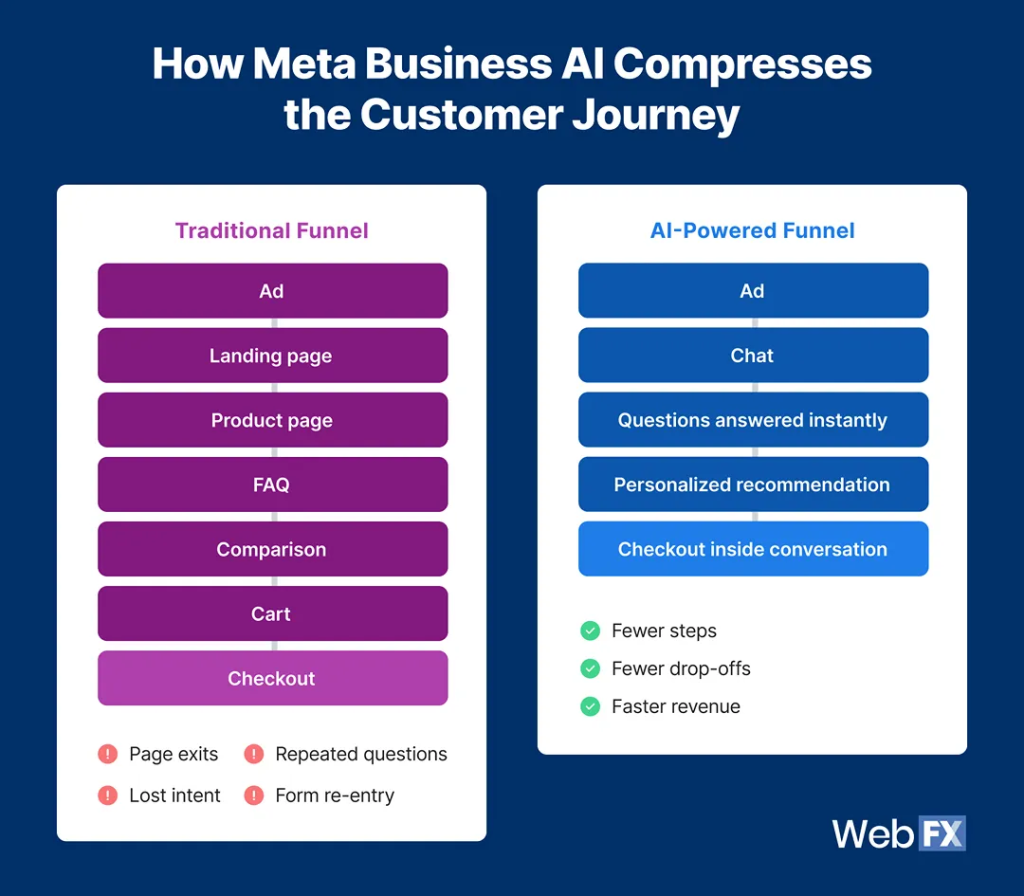
Meta Business AI doesn鈥檛 operate like a or rule-based automation. It runs on a three-part architecture that enables intelligent, accurate, and scalable customer conversations.
1. Learning engine
Business AI uses and to absorb signals from your catalog, website, ads, social content, and brand voice. It then uses this information to respond intelligently and consistently across Meta鈥檚 entire ecosystem鈥攊ncluding WhatsApp, Facebook, Instagram, Messenger, and your website.
2. Conversational intelligence
Its cross-surface intelligence eliminates the microfrictions that lengthen buying cycles. It delivers answers instantly, in context, and with the precision of a system trained on your own structured and unstructured business data.
3. Optimization layer
The system includes built-in escalation to notify your team when human intervention is needed for complex or high-value conversations. Every interaction flows back into Meta鈥檚 performance dashboards, providing insight into customer questions, hesitation points, and top-performing products鈥攁llowing teams to continuously refine and optimize the experience.
How businesses will use Meta AI in 2026 (Core use cases)
Businesses aren鈥檛 adopting Meta AI because it鈥檚 novel. They鈥檙e adopting it because it reshapes the mechanics of how customers make decisions across Meta鈥檚 ecosystem.
In 2026, the most effective use of Meta AI will be to compress and streamline the customer journey. Instead of forcing users through a sequence of steps designed a decade ago (click 鈫� browse 鈫� compare 鈫� decide), Meta AI allows brands to meet a customer鈥檚 intent the moment it appears.
1. Ad-to-chat commerce
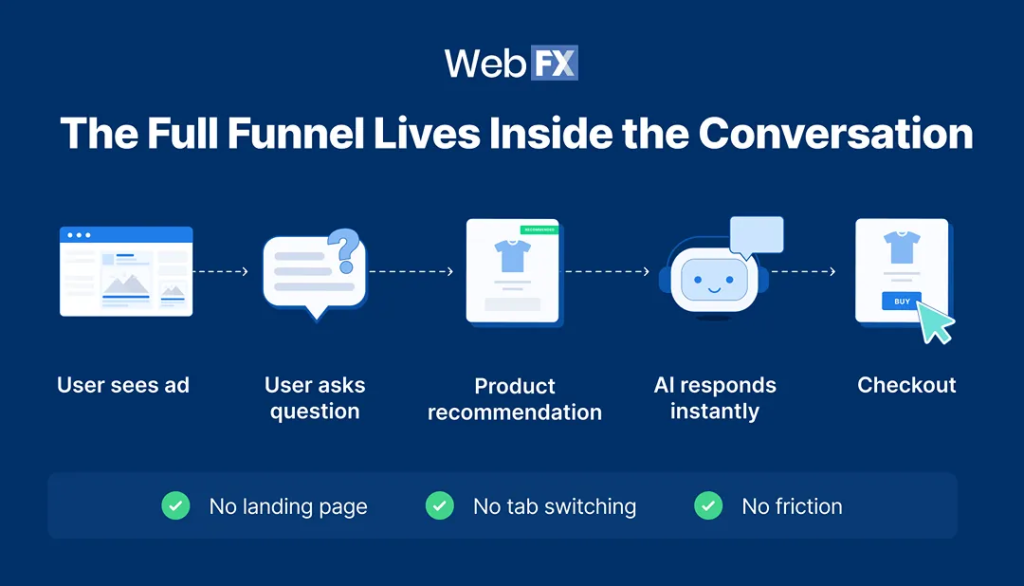
A primary use case for Meta's Business AI product is real-time sales enablement directly inside Facebook and Instagram ads. For the first time, advertisers will run a 鈥渇ull funnel inside a chat鈥� rather than sending users to a landing page.
Customers will be able to complete all these tasks inside one ad without being directed to different pages:
- Ask questions about products
- Get sizing, pricing, and availability
- Receive tailored recommendations
- Compare options
- Resolve objections
- Purchase without leaving the ad
2. Personalized product recommendations (Catalog-driven intelligence)
Personalization is a significant driver of higher in the Advantage+ system 鈥� Business AI brings that same logic into conversation.
- User preferences
- Past interactions
- Stated needs
- Behavioral signals
- Customer segment
3. Guiding customers through complex decisions
Online purchases are complex. They require comparisons, clarifications, feature breakdowns, alternative recommendations, and confidence-building information.
Business AI is designed for that middle-of-funnel friction 鈥� the space where most buying intent fails. It interprets the customer鈥檚 intent, offers the most relevant options, and guides them toward the product that best matches their needs.
It replicates 鈥� and in many cases enhances 鈥� the role of a knowledgeable sales associate, but does so instantly and at scale.
4. Accelerating creative production
With Meta鈥檚 Business AI, creative production becomes faster and more adaptable.
Meta鈥檚 AI-enhanced creative tools, including persona-targeted ad images, AI dubbing, multilingual captions, and generative music, enable marketing teams to scale creative variations without increasing workload. This means faster campaign iteration, more relevant ads, and stronger performance at lower cost.
Instead of waiting for production cycles or navigating complex diagnostics, marketers get immediate recommendations and auto-generated creative assets that improve performance.
5. Automating customer service
Messenger and WhatsApp have become critical customer touchpoints for many businesses 鈥� but they鈥檙e also the hardest to scale. As message volume grows, teams struggle to keep up, response times slow down, and high-intent conversations slip through the cracks. Meta Business AI changes that dynamic entirely.
Instead of treating messaging as a workload problem, Business AI turns it into a conversion opportunity. The system handles the repetitive, time-sensitive questions that dominate these channels and delivers accurate, catalog-driven responses instantly. Customers get answers the moment they need them, not hours later when interest has cooled.
Business AI absorbs the front-line volume so your team can focus on the interactions that actually require human judgment 鈥� resolving complex issues, nurturing high-value leads, and closing sales that benefit from human guidance.
6. Strengthening creator and community-driven campaigns
Creator partnerships have always performed well on Meta platforms, but they鈥檝e also been one of the hardest levers for marketing teams to scale. Matching the right creator to the right product at the right time requires hours of manual vetting, negotiation, and testing 鈥� and even then, performance can be unpredictable.
How to access Business AI across the Meta ecosystem (2026 Update)
In 2026, businesses will access Business AI through the platforms they already use daily, without adding new software or rebuilding existing workflows.
Access point 1: Meta Business Suite
Meta Business Suite is your primary command center and where onboarding into the Meta ecosystem begins for most businesses. It serves as the operational layer where you configure how the AI speaks, which topics it handles, and how it escalates conversations to human teammates.
It gives marketing leaders centralized control over messaging automation across Messenger, Instagram DMs, WhatsApp, and your website. Features available with Meta Business AI include:
- AI-powered responses in Messenger and Instagram DMs
- Access to training tools, knowledge uploads, and testing
- Performance dashboards and insights
- Brand voice customization
- Automated response routing and escalation
Business AI via Business Suite is available in the U.S. first, expanding internationally through 2026.
Access point 2: WhatsApp
WhatsApp is the only Meta platform where Business AI can be activated entirely inside the app, without needing Business Suite. AI-generated messages are labeled AI. All messages sent/received in AI-enabled chats may be used to improve Meta鈥檚 AI models.
Accessing the Meta Business AI through WhatsApp gives you access to:
- Automated replies for FAQs, pricing, availability, shipping, and catalog questions
- After-hours coverage
- Recommendation engine powered by your product catalog
- Real-time lead qualification + escalation
However, you must have a phone number registered to WhatsApp Business and a WhatsApp product catalog, which can be created during setup.
Access point 3: Messenger
Messenger access is controlled entirely through Meta Business Suite. Once Business AI is set up in Business Suite:
- Messenger automatically activates it
- Customers start receiving instant responses within Messenger
- Your team sees all AI-assisted conversations in the Inbox
- AI only replies when it has enough confidence to answer accurately
- You鈥檙e notified immediately if the AI needs human help
Important: You can turn Business AI off at any time. Meta provides a toggle for enabling or disabling AI responses within Messenger.
Access point 4: Instagram
Instagram doesn鈥檛 offer an in-app switch for Business AI. Instead, the AI agent is activated through Meta Business Suite, and once configured, it automatically responds in Instagram DMs the same way it does on Messenger.
You must have:
- An Instagram Business Account connected to your Facebook Page
- Messaging is enabled for your Instagram profile
- Business AI set up inside the Meta Business Suite
Access point 5: Website integration
Website integration remains limited to select regions (U.S. first), but setup follows a similar pattern:
- Go to Meta Business Suite 鈫� Business AI.
- Select Website Integration.
- Install the provided script on your website (via <head> tag or CMS plugin).
- Connect the catalog + website content so AI can respond accurately.
This creates a unified conversational experience across ads, messaging, and your own site.
Key considerations when using Meta AI for your business
Meta AI gives businesses a significant ability to automate conversations, accelerate decision-making, and reduce operational load. But successful adoption requires more than simply turning the tool on. Marketing leaders must understand how the system behaves, what it needs to perform well, and where human oversight remains essential.
The following considerations matter most in 2026.
- Input accuracy: Your AI is only as strong as the foundation you give it. Businesses that regularly update product data, refine FAQs, and clarify policies see the highest response accuracy and customer satisfaction.
- Clear human escalation strategy: Complex purchases, high-value orders, nuanced service questions, and emotionally sensitive conversations require a real person. Define rules for when and how AI should hand off to humans.
- Messaging features change: Once Business AI is enabled, some features, such as broadcast lists and disappearing messages on WhatsApp, are disabled. This makes it necessary to evaluate workflow impact, especially if you rely on WhatsApp for bulk communications or time-sensitive messaging.
- Need for AI-usage transparency: User trust increases when brands disclose AI usage beforehand. Meta always discloses to users when an AI agent is active. Customers see labels like 鈥淎I responding鈥� or 鈥淎I-generated message鈥� in Messenger, Instagram DMs, and WhatsApp.
- Business AI requires ongoing training: The businesses seeing the strongest results treat AI as a member of the team 鈥� not a static tool. Your business AI gets better with ongoing iteration, optimized recommendations, and fewer escalations.
2026 Meta Business AI integration checklist (Strategic plan)
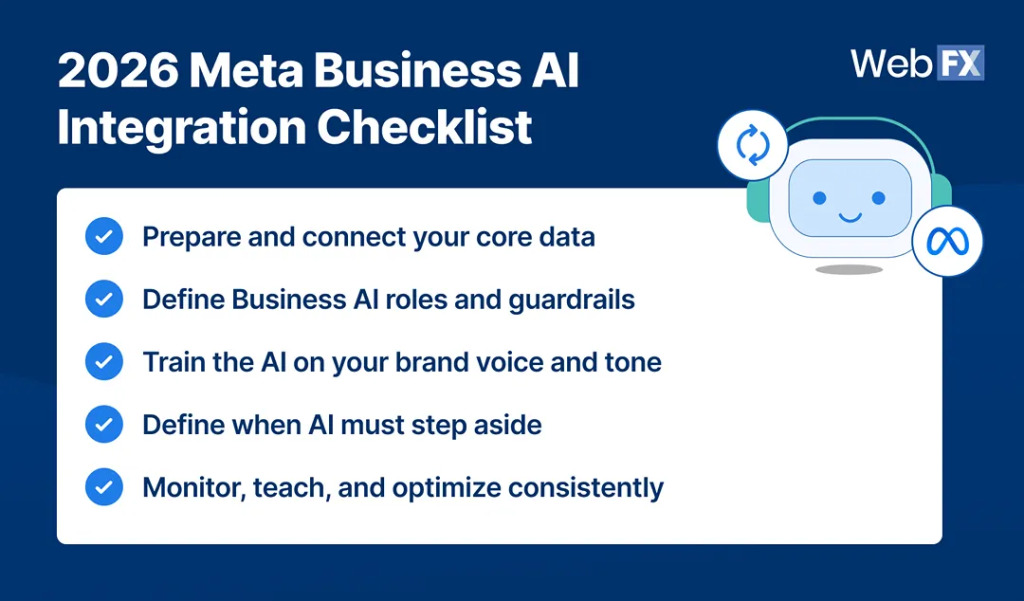
Integrating Meta Business AI isn鈥檛 just about activating the tool 鈥� it鈥檚 about preparing your data, your workflows, and your teams so the AI can operate with accuracy, consistency, and measurable impact.
The following plan outlines the sequence businesses should follow to ensure their AI deployment performs well from day one and continues improving over time.
- Prepare and connect your core data: Before setup, ensure your catalog, website content, FAQs, and policies are accurate and up to date 鈥� then connect them to Meta Business Suite or WhatsApp Business so the AI can learn from authoritative sources.
- Define Business AI roles and guardrails: Clarify what the AI should handle (pricing, availability, product suggestions, shipping questions) and what should still be escalated to a human. Establishing boundaries early protects brand integrity and customer experience.
- Train the AI on your brand voice and tone: Teach Business AI to mirror your voice and tone by uploading documents, guidelines, sample messages, and reference materials. This will ensure its correspondence feels human, trustworthy, and on-brand.
- Define when AI must step aside: A strong escalation design keeps AI helpful while ensuring humans handle moments that require judgment, empathy, or nuance.
- Monitor, teach, and optimize consistently: The brands seeing the highest ROI treat Meta AI as a system that improves over time, not a one-time setup.
was produced by and reviewed and distributed by 黑料社.